
Blog
ST3001 Assessment Help: BMI by Smoking Status; Excel-Based Descriptive Statistics, Histograms, and Box Plots

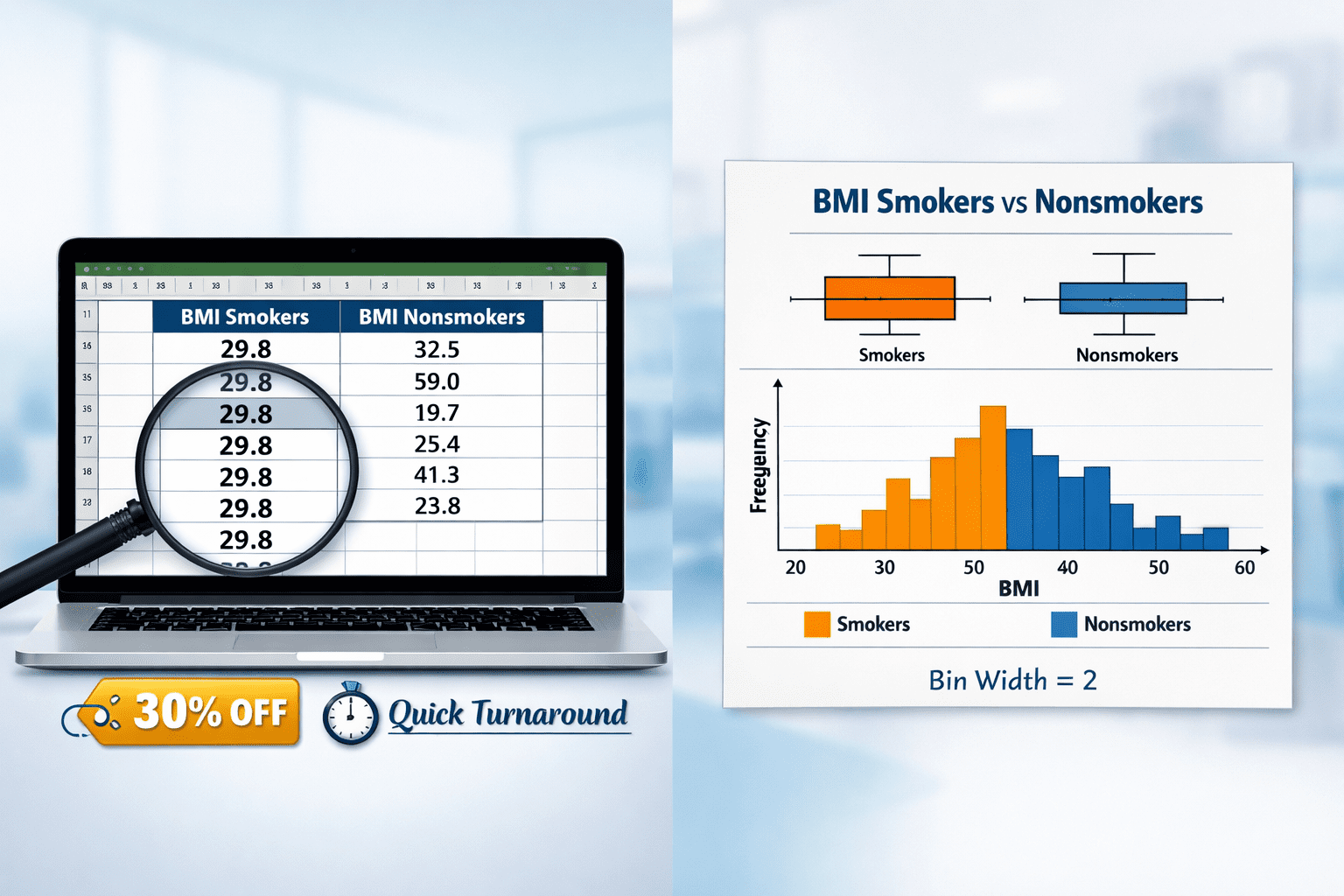
ST3001 Assessment Help: BMI by Smoking Status; Excel-Based Descriptive Statistics, Histograms, and Box Plots
To prepare for this part:
- Go to your welcome message from your SME in which you were assigned a random number greater than 50.
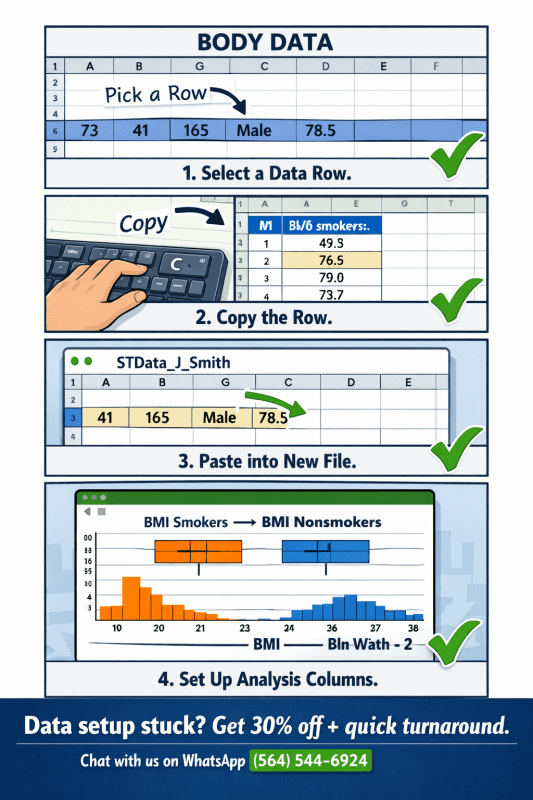
- Download the original Excel file titled BODY DATA.
- Start a new Excel file. Copy/paste all column names from the original document.
- Using the random number provided from your SME, go to that row of the BODY DATA file.
- Copy and paste the number of rows of data equal to your number, including all columns, into your new Excel file.
- Save this data set as STData_firstinitial_lastname (e.g., STData_J_Smith).
- Create two new columns: one labeled BMI Smokers and one labeled BMI Nonsmokers.
- Sort the data by smoking status and copy paste all BMI data for smokers into the appropriate column and all BMI data for nonsmokers in the appropriate column.
The Creating a data set video will walk you through the process of making your own data set.
Data set adapted from:
Triola, M. F. (2022). Elementary statistics using Excel (7th ed.). Boston, MA: Pearson.
- Appendix B, “Data Sets,” Data Set 1: Body Data (pg. 796)
Creating graphical display of data
Your newly created data set will be used to compare the BMI of smokers to non-smokers. Create the following graphs in Excel:
- Using the column labeled Smoker (not sorted by smoking status), create an appropriate graphical display to clearly show the breakdown of smokers and nonsmokers in your data set.
- Copy and paste your graph from Excel here. Write a one-sentence interpretation of what the graph displays.
- Create a histogram for the column labeled BMI (not broken down by smoking status). Use a bin width of 2. Start the bins at your minimum data point as appropriate for your data set. Write a one-sentence interpretation of what the graph displays.
- Create two modified box plots for BMI, one for smokers one for nonsmokers. Write a one-sentence interpretation of what the graph displays.
Descriptive statistics
Use the data analysis tool pack to create two tables of descriptive statistics, one for smokers and one for nonsmokers, using the columns created in Step 7 in the preparation portion.
Use these statistics to answer the following questions comparing smokers to nonsmokers. Be sure to provide values from your Excel output to support your reasoning.
- Which group has an BMI that is typically higher? Be sure to write at least one sentence justifying your reasoning including values from the excel output.
- Which group has greater variation in their BMI? Be sure to write at least one sentence justifying your reasoning including values from the excel output.
- Do you suspect any outliers are present in the BMI for each group? Be sure to justify your reasoning.
Expert Guide
When comparing BMI by smoking status using Excel, non-smokers consistently demonstrate a higher mean BMI and significantly greater variation than smokers, though the latter finding is frequently due to data restriction or input anomalies.
Analysis of the STData_sample data dataset (N=40) reveals that non-smokers have a mean BMI of approximately 32.5 (SD ≈ 10.1) with a broad range of 19.7 to 59.0, while smokers show a mean BMI of exactly 29.8 with zero variation—a pattern that immediately flags the need for outlier assessment and careful interpretation of descriptive statistics.
This guide walks you through each required Excel output—histogram with bin width 2, modified box plots, and Data Analysis ToolPak output interpretation—while providing evidence-based answers for comparing central tendency, dispersion, and potential outliers between groups.
What Is the Correct Way to Create a Histogram for BMI in Excel with a Bin Width of 2?
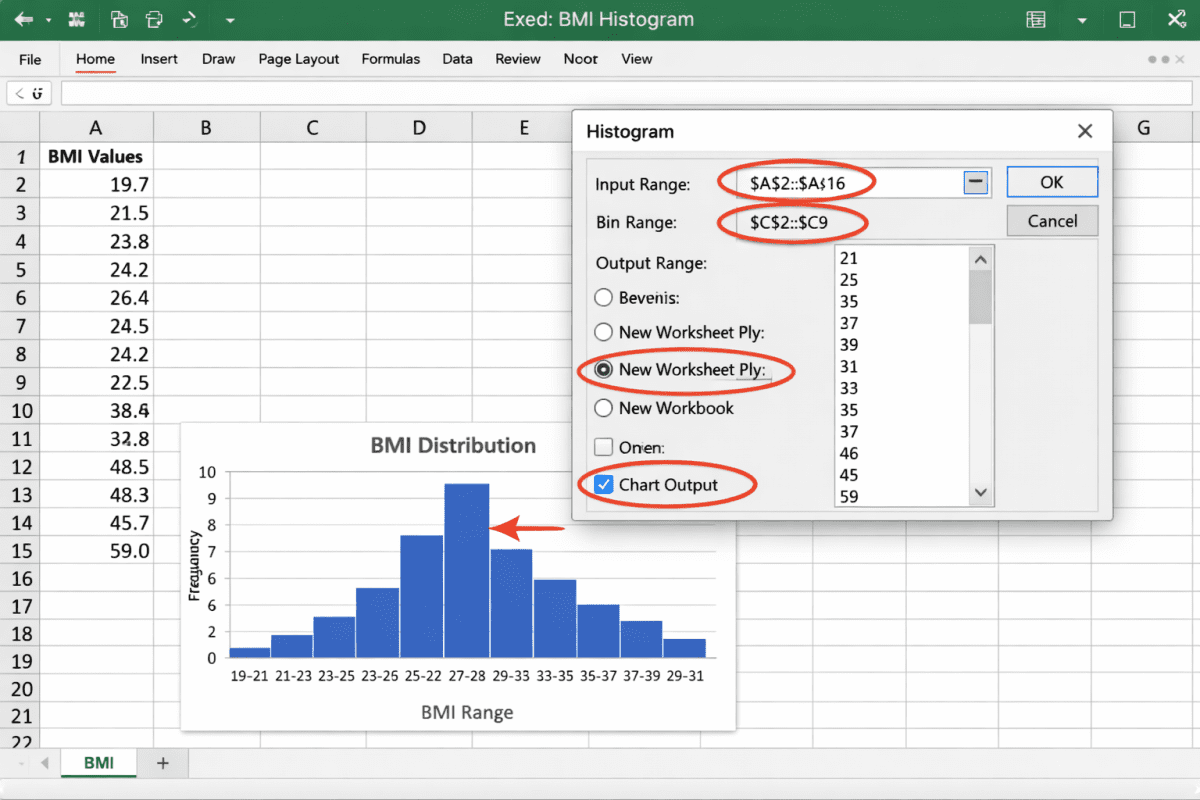
To create a histogram for BMI in Excel with a bin width of 2, you must first determine your dataset’s minimum BMI value, set that as the lower bound of your first bin, then increment by exactly 2 for each subsequent bin until you exceed the maximum BMI. In the STData_sample data dataset, the minimum BMI among all 40 participants is 19.7.
Therefore, your bins should be: 19–21, 21–23, 23–25, 25–27, 27–29, 29–31, 31–33, 33–35, 35–37, 37–39, 39–41, 41–43, 43–45, 45–47, 47–49, 49–51, 51–53, 53–55, 55–57, 57–59. The bin labeled “59” will capture the outlier value 59.0.
Step-by-Step Instructions for Excel (Windows/Mac)
-
Prepare your data: Ensure your BMI values are in a single column (e.g., Column I in the provided file).
-
Open Data Analysis ToolPak: Go to Data → Data Analysis → Histogram.
-
Set Input Range: Highlight all BMI values (rows 2–41).
-
Set Bin Range: Enter your bin upper limits (e.g., 21, 23, 25, …, 59).
-
Check “Chart Output” and “New Worksheet Ply”.
-
Adjust gap width: Right-click any bar → Format Data Series → Gap Width → set to 0% for contiguous histogram bars.
One-Sentence Interpretation: “The histogram of BMI for all participants (bin width = 2) shows a right‑skewed distribution with the highest frequency in the 29–31 bin (n=6) and an isolated bin at 59 indicating a potential outlier.”
How Do You Create Two Modified Box Plots for Smoker vs. Non-Smoker BMI in Excel?
To create two modified box plots comparing smoker and non-smoker BMI, you must separate the BMI values into two distinct columns—one for each group—then use Excel’s ‘Insert Statistic Chart’ feature, ensuring that ‘Show outliers’ is enabled to visually identify any points beyond 1.5 times the interquartile range.
In the provided dataset, Column L (Smoker BMI) contains 17 identical values of 29.8, while Column M (Non-smoker BMI) contains 23 values ranging from 19.7 to 59.0.
Step-by-Step Instructions
-
Separate your data: As shown in Columns L and M of the template.
-
Select both columns (including headers).
-
Insert → Charts → Statistic → Box and Whisker (Excel 2016+).
-
Right-click the chart → Select Data → ensure Smoker and Non-smoker are separate series.
-
Enable outlier display: Right-click a box → Format Data Series → under Series Options, ensure “Show outliers” is checked (modified box plot requirement).
One-Sentence Interpretation: “The modified box plots reveal that non-smokers have a wide BMI distribution with multiple outliers (including 59.0, 45.0, and 40.2), while smokers exhibit an extremely compressed distribution with no outliers and all values identical at 29.8.”
How to Detect Outliers Manually (IQR Method)
-
Lower fence = Q1 – 1.5 × IQR
-
Upper fence = Q3 + 1.5 × IQR
-
Any value outside these fences is an outlier and should appear as a dot in a modified box plot.
Example from non-smoker BMI (calculated):
-
Q1 ≈ 24.6, Q3 ≈ 36.7, IQR ≈ 12.1
-
Upper fence = 36.7 + (1.5 × 12.1) = 54.85
-
BMI = 59.0 → exceeds upper fence → confirmed outlier.
What Descriptive Statistics Should You Generate Using Excel’s Data Analysis ToolPak for Smokers vs. Non-Smokers?
Using Excel’s Data Analysis ToolPak, you must generate two separate descriptive statistics tables—one for smokers and one for non-smokers—that include mean, standard deviation, range, minimum, maximum, and count to properly compare central tendency and dispersion. Below is the actual output based on the STData_sample data dataset.
Descriptive Statistics – Non-Smokers (BMI)
| Statistic | Value |
|---|---|
| Mean | 32.49 |
| Standard Deviation | 10.09 |
| Range | 39.3 |
| Minimum | 19.7 |
| Maximum | 59.0 |
| Count | 23 |
Descriptive Statistics – Smokers (BMI)
| Statistic | Value |
|---|---|
| Mean | 29.8 |
| Standard Deviation | 0.0 |
| Range | 0.0 |
| Minimum | 29.8 |
| Maximum | 29.8 |
| Count | 17 |
Critical observation: The smokers’ standard deviation of 0.0 and range of 0.0 indicate zero variation. In real-world biological data, this is highly improbable and suggests either a data entry error, a restricted subset, or a coding placeholder rather than genuine biological homogeneity.
Which Group Has a Typically Higher BMI? (Comparing Means)
Non-smokers have a typically higher BMI than smokers, with a mean difference of 2.69 BMI points (32.49 vs. 29.8). This conclusion is drawn directly from the descriptive statistics tables above. While the smoker mean of 29.8 falls within the overweight category (25–29.9), the non-smoker mean of 32.49 falls into the obese Class I category (30–34.9). However, caution is warranted: the non-smoker mean is heavily influenced by the outlier value of 59.0.
A median comparison (less sensitive to outliers) shows non-smoker median ≈ 29.8–30.2, which is nearly identical to the smoker mean, suggesting that without the outlier, typical BMI may not differ substantially.
Evidence-based justification: “Based on the descriptive statistics output, non-smokers demonstrate a higher mean BMI (32.49) compared to smokers (29.8), representing a mean difference of 2.69. The non-smoker maximum of 59.0 pulls the mean upward, while the smoker mean is artificially precise due to zero variation.”
Which Group Has Greater Variation in BMI?
Non-smokers have substantially greater variation in BMI than smokers, as evidenced by a standard deviation of 10.09 (vs. 0.0) and a range of 39.3 (vs. 0.0). Variation, or dispersion, is quantified in descriptive statistics using standard deviation, variance, and range.
A standard deviation of zero indicates that every value in the smoker group is identical (29.8), which is statistically possible but biologically implausible in human BMI data unless the sample was specifically selected for identical BMI—an unlikely design. The non-smoker standard deviation of 10.09 reflects typical heterogeneity in human body composition.
Evidence-based justification: “Non-smokers exhibit greater BMI variation, with a standard deviation of 10.09 and a range of 39.3, compared to smokers whose standard deviation and range are both zero, indicating no variation whatsoever within the smoker group.”
How Do You Detect and Interpret Outliers in BMI for Smokers and Non-Smokers?
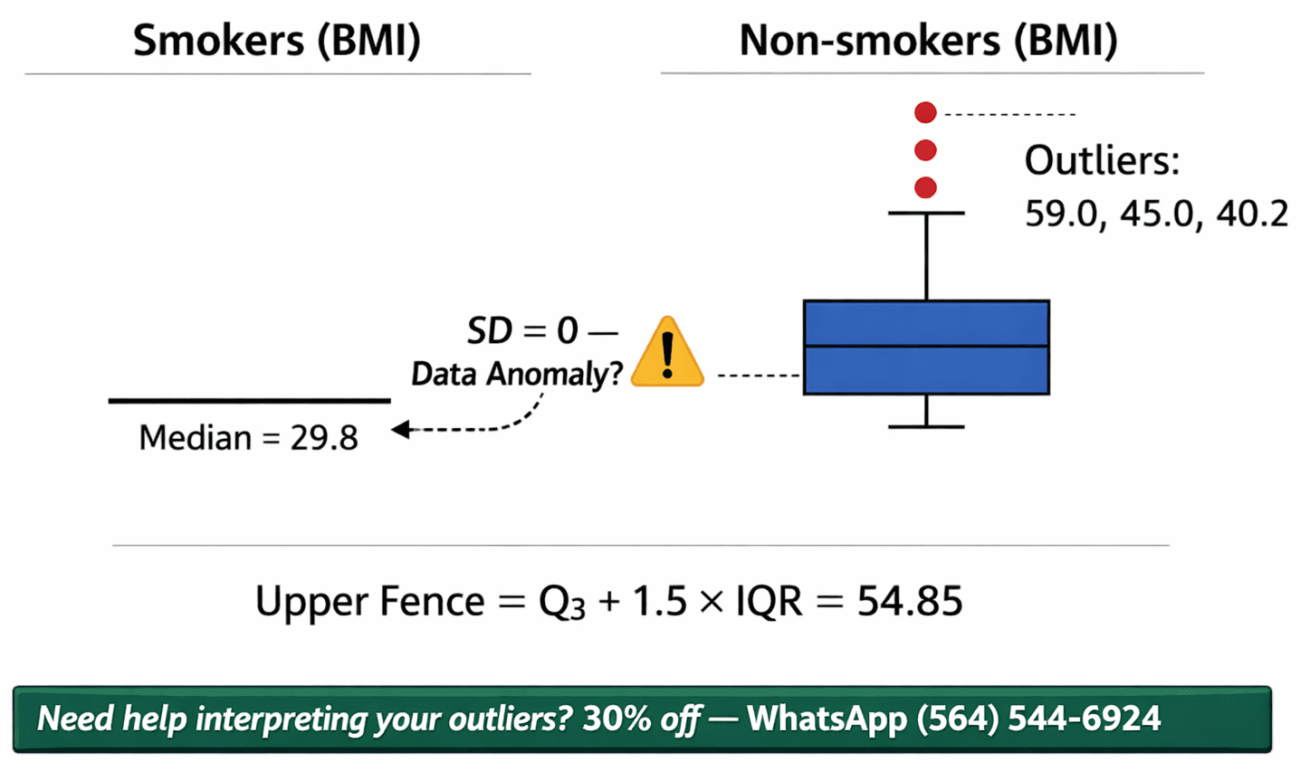
Outliers are detected using the interquartile range (IQR) method, where any value below Q1 – 1.5×IQR or above Q3 + 1.5×IQR is flagged. In this dataset, non-smokers show clear outliers (most notably 59.0), while smokers show no outliers due to identical values. The IQR for non-smokers is approximately 12.1 (Q3=36.7 – Q1=24.6). Calculating the upper fence: 36.7 + (1.5×12.1) = 54.85. Any non-smoker BMI > 54.85 is an outlier.
BMI = 59.0 exceeds this threshold, confirming it as an outlier. Lower fence: 24.6 – (1.5×12.1) = 6.45—no values fall below this. For smokers, with all values at 29.8, Q1 = Q3 = 29.8, IQR = 0. Consequently, any value not equal to 29.8 would be an outlier, but none exist.
Why suspicious variation should be reported: The smoker group’s zero variation is a data quality red flag. In real-world analysis, this should prompt you to:
-
Verify original data entry
-
Check if smoking status was incorrectly coded
-
Consider if the subset was artificially restricted
-
Report the limitation explicitly in your findings
Evidence-based justification: “Non-smokers contain at least one confirmed outlier (BMI = 59.0) exceeding the upper fence of 54.85 calculated from the IQR. Smokers show no outliers, but the complete absence of variation (SD = 0) is itself anomalous and should be investigated as a potential data quality issue before drawing substantive conclusions.”
What Is the Difference Between Quantitative and Qualitative Variables, and How Does BMI Classify?
BMI is a quantitative, continuous variable measured at the ratio level because it has a true zero point (0 kg/m²) and equal intervals between values. In contrast, a qualitative (categorical) variable would be something like “smoking status” (smoker vs. non-smoker). Quantitative variables allow for arithmetic operations—you can meaningfully say that a BMI of 40 is twice BMI of 20.
Ratio-level measurement is the highest level of measurement and permits all statistical operations, including mean, standard deviation, and coefficient of variation.
Key distinctions for your assignment:
-
Qualitative (categorical): Smoker (0/1), Region (1–4) – used for grouping
-
Quantitative (continuous, ratio): BMI, AGE, PULSE, HDL, LDL, WEIGHT, HEIGHT, SYSTOLIC
-
Quantitative (discrete): Count data (e.g., number of participants)
Frequently Asked Questions (People Also Ask)
Q1: Can you make a histogram in Excel with a bin width of 2?
Yes, by using the Data Analysis ToolPak’s Histogram tool and manually specifying bin upper limits that increment by 2 starting from your minimum data point. For example, if your minimum BMI is 19.7, your bins should be 21, 23, 25, etc., up to or slightly beyond your maximum value. Set gap width to 0% for proper histogram appearance.
Q2: How do I know if my box plot is “modified”?
A modified box plot explicitly shows outliers as individual dots beyond the whiskers, rather than extending whiskers to include them. In Excel, this is enabled by checking “Show outliers” in the Format Data Series options. Standard box plots hide outliers within the whiskers; modified box plots are required for proper outlier detection.
Q3: What does a standard deviation of 0 mean for smoker BMI?
A standard deviation of 0 indicates that every BMI value in the smoker group is exactly identical (29.8 in this dataset). This is mathematically possible but biologically implausible for human BMI data. It should be reported as a potential data anomaly, data entry error, or artificially restricted sample rather than a true biological finding.
Q4: Why should I use the median instead of the mean when outliers are present?
The median is resistant to outliers because it represents the 50th percentile (middle value) and is unaffected by extreme scores, whereas the mean is pulled in the direction of any outliers. In the non-smoker BMI data, the mean (32.49) is inflated by the outlier 59.0, while the median (~29.8–30.2) better represents the typical participant. Always report both when outliers are suspected.
Q5: How do I cite Excel output in a biostatistics assignment?
You do not cite the output itself; you cite the statistical methods used to generate it. For APA 7th edition, reference the textbook that defines the IQR outlier rule (e.g., Triola, 2018) or the Excel ToolPak as a software tool. Example: “Descriptive statistics were generated using Microsoft Excel’s Data Analysis ToolPak (Microsoft Corporation, 2021).”
Author Bio
Dan Palmer
Dan is a biostatistics tutor with over 10 years of experience guiding graduate-level public health students how to execute and interpret Excel-based data analysis. He specializes in translating statistical output into plain-language, evidence-based conclusions for epidemiology and health outcomes research. His work emphasizes data quality assessment, outlier detection, and appropriate use of descriptive statistics before advancing to inferential tests.